interactive

  • Voting similarities between Netherland cities

    September 18, 2012 to Mapping by Nathan Yau

    Voting similarities between Netherland cities

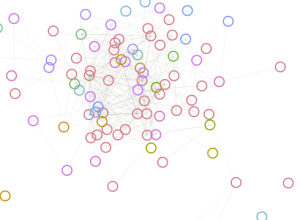
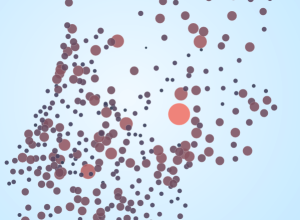
    This month the Netherlands held national elections, and now that the results are in, interaction designer Jan Willem Tulp had a look at voting similarity between cities. I'm not sure what metric was used to judge similarity, but it looks like it was based on voting distributions for candidates.

    Each circle represents a city, and you can choose between a geographic layout or a radial one. When you select a circle, the others change size and color, where more red and larger means more similar. In the radial layout, circles that are farther are away are less similar. Be sure to look at the city of Urk in the radial layout. According to Tulp, it's the most religious city, and it votes completely differently from the rest. [Thanks, Jan]

  • Who pays for healthcare, 1960 to 2010

    August 27, 2012 to Statistical Visualization by Nathan Yau

    Health care spending

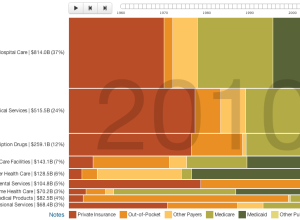
    Josh Cothran looked at who's paid for healthcare over the past five decades, with an animated Marimekko chart.

    In 1960, almost 100% of the spending on prescription drugs came out of the consumer's pocket; by 2010, out-of-pocket spending was down to 20%. Over the past 50 years, there have been major shifts in the way hospital care, physician services, long-term care, prescription drugs, and other services and products are paid for. This interactive graphic uses data from the Centers for Medicare and Medicaid Services to show national spending trends from 1960 to 2010 for health care by payer.

    In case you're unfamiliar with the layout, there are two visual dimensions to the Marimekko. On the vertical is percentage for the main categories: hospital care, physicians and clinical services, etc. On the horizontal is a breakdown of the main categories: private insurance, Medicare, etc. The animation brings time as a third dimension for which the overall size of the chart is constant, so pay attention to the changing relative percentages.

  • Most common London surnames mapped

    August 20, 2012 to Mapping by Nathan Yau

    London surnames zoom

    James Cheshire, a geography lecturer at the University College London, mapped common surnames in London.

    This map shows the 15 most frequent surnames in each Middle Super Output Area (MSOA) across Greater London. The colours represent the origin of the surname (not necessarily the person) derived from UCL's Onomap Classification tool. The surnames have also been scaled by their total frequency in each MSOA.

    A slider lets you browse through the most common down to the 15th most common, revealing clusters of cultural majorities, down to minorities.

  • Character social networks in movies

    August 17, 2012 to Network Visualization by Nathan Yau

    Movie Galaxies

    We've seen a lot of network charts for Twitter, Facebook, and real people. Screw that. I want to see social networks for movie characters. That's where Movie Galaxies comes in.

    Movies are important artefacts, bringing together vision and zeitgeist of our society. Embodying dreams, trends and other perspectives, they are a cultural vanishing point for millions of people in the world, that is worth to be explored. Just think about how your personal life and worldwide network with their single sub-clusters and side-stories are structurally represented in motion pictures. You might be surprised. We have a hunch that the "holy grail" of good movies is far more about social network structures than budget, cast and theme.

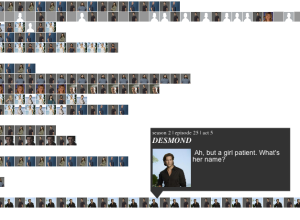
    With movie scripts as the data source, Movie Galaxies quickly shows main characters, the extent to which they interact, and hints at a movie's timeline. For example, in the first Lord of the Rings movie, the central plot was tied to a lot of characters, whereas in Forrest Gump, everything was tied to one character.

    There are metrics, such as density and clustering, associated with each network, which could be made less technical sounding, but it's fun to browse and search your favorite movies. I clicked around for a good half hour.

  • Circular Network Layout

    How to Make an Interactive Network Visualization

    Interactive network visualizations make it easy to rearrange, filter, and explore your connected data. Learn how to make one using D3 and JavaScript.
  • Map of the Internet

    July 30, 2012 to Network Visualization by Nathan Yau

    The Internet Map

    Ruslan Enikeev created a searchable Internet map of links and bubbles, showing over 350,000 sites and two million links from 196 countries. Similar sites are closer together.
    Continue Reading

  • Worldwide mood around London 2012

    July 27, 2012 to Data Art by Nathan Yau

    Olympic mood

    No doubt there is going to be a lot of tweeting about the Olympics during the next couple of weeks, but sometimes it's hard to get a sense of what people are talking about because of the high volume. Emoto, a team effort by Drew Hemment, Moritz Stefaner, and Studio NAND, is a Twitter tracker that aggregates sentiment around topics.
    Continue Reading

  • Tracking the spread of AIDS

    Spread of AIDS

    Adam Cole and Nelson Hsu for NPR plotted the percentage of people, ages 15 to 49, living with HIV from 1990 to 2009.

    By 1990, the world had a pandemic on its hands. In 1997, the peak of the epidemic, more than 3 million people became newly infected with HIV.

    Then science struck back. Drugs approved for HIV treatment in the mid-1990s proved profoundly effective, transforming AIDS from a death sentence to a chronic illness. Those treatments, combined with an international commitment to manage the disease by providing access to free drug therapy, led to a steep drop in new HIV infections.

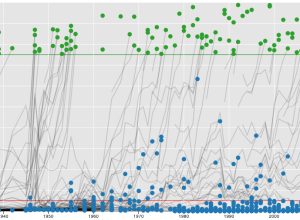
    The countries in middle, eastern, and southern Africa stand out in the chart, like Swaziland with a whopping 25.9%, but most areas cluster well below five percent. Although the drop-down filters help some with country selection, the data probably would've benefitted from a chart that had a self-updating vertical axis.

  • Stop-and-frisk hotspots mapped

    July 18, 2012 to Mapping by Nathan Yau

    Stop and Frisk

    WNYC mapped all street stops that resulted in the recovery of a gun, based on data from the New York police department. On top of that, the green spots, they mapped areas where police search more frequently.

    Mayor Michael Bloomberg and Police Commissioner Raymond Kelly argue the main purpose of stop-and-frisk is to get guns off the street. Out of more than 685,000 stops in 2011, about 770 guns were recovered. That means about one tenth of one percent of all stops result in the seizure of a gun.

    But those guns are not showing up in the places where the police are devoting the most stop-and-frisk resources.

    I'm sure a lot of people's initial reaction to this map went something like this: "Psh. The police don't have a clue what they're doing," which was one possibility the article suggested. The other was that the stops are working as a deterrent.

    What's more likely: Police officers have managed to end up in almost every area where there are fewer guns (and missed where there are more guns), or people with guns avoid the areas where there are a lot officers? I'm gonna go with the police point of view on this one.

  • Where you measure up against Olympians

    Athletes like you

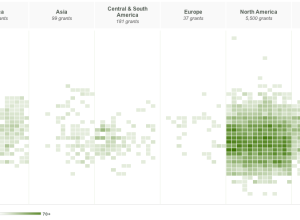
    I think the theme of this year's Olympic graphics is how you relate to athletes. In this interactive by the BBC (in Spanish), height and weight of medal winners from the last Olympics in Beijing are plotted against each other. The more red, the more athletes with that weight-height combination, and you can click on a square to see the corresponding athlete(s). The twist is that you can enter your own height and weight to see where you are in the mix.

    Combine this with the recent age piece from the Washington Post, and you've got a more complete picture. Why stop there though? I want country, gender, and hair color breakdowns. [Thanks, Ben]

  • A graphical summary of Euro 2012 on Twitter

    Euro2012 on Twitter

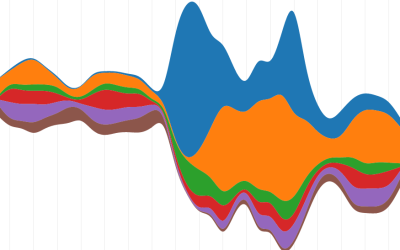
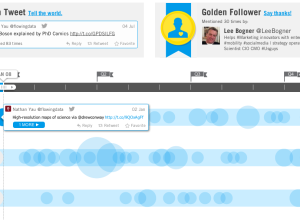
    Nicolas Belmonte, a data visualization scientist at Twitter, visualized the change in tweet volume during Euro 2012. It starts with a streamgraph for an overall view, and when you click on a team you get a time series for each of that team's matches. The selected team appears on top, and the team they are against is on the bottom. Goals are also marked adding context to the spikes.

    I didn't watch any of the championship and know next to nothing about soccer, but Belmonte's piece is useful and fun to use. Would come again.

  • Side-by-side comparisons for Australian Census

    Australia Census explorer

    Last week, Australia released data for their 2011 Census. Small Multiples, in collaboration with Special Broadcasting Service, put the data to use and built an interactive that compares demographics based on primary language or location. Choose a language from the dropdown menu on both the left and right, and your selections are presented side-by-side. The graphics themselves are fairly straightforward, showing estimates of things like gender and household income, but the key is in the comparison, which provides a sense of scale to what would otherwise be a bunch of percentages.

  • Stars in the zodiac constellations, from Earth and space

    June 27, 2012 to Mapping by Nathan Yau

    Close to Home

    While we're on the subject of stars, developer Riley Davis modeled the ones in the zodiac constellations and color-coded them by temperature. He also labeled the constellations and included the celestial equator (the projection of Earth's equator into space), ecliptic (path of the sun), and the sun, which moves in real-time. The interactive starts with a view from space, where the little blue dot is Earth, and when you release the camera, you see the stars from our point of view.

    I was disoriented at first with the navigation but got used to it quickly. Movement of the mouse left to right zooms in and out, and movement top to bottom rotates the perspective. Feels a lot like flying through space. Well how I imagine it to be, at least.

  • An interactive view of star constellations

    June 27, 2012 to Mapping by Nathan Yau

    Views of the sky

    When we look up at the night sky to gaze at the stars, we see small, glowing dots that we perceive almost as if they were drawn on a flat surface. However, all these dots vary in distance from us. View of the Sky by visualization developer Santiago Ortiz shows this third dimension of depth.

    The constellations are placed on a sphere that you can zoom and rotate. This is an interesting view in itself, but select the perspective for absolute distance and magnitude, and you'll see something completely different. It's no longer a network that resembles a globe, and instead it morphs to a cloud of stars and randomness. Also see Ortiz's first view of the sky that includes stars not part of major constellations.

  • Commute times in your area, mapped

    June 26, 2012 to Mapping by Nathan Yau

    Commute map

    When you look for a place to live, there are outside factors to consider other than price and square footage. You want to know what the area is like. How's the crime? Are the schools nearby good or bad? Housing search site Trulia provides this information with Trulia Local. Using data from OpenStreetMaps and General Transit Feed Specification feeds, it just got better with their most recent addition that maps commute times.

    Commuting sucks. It’s stressful, and no amount of Sirius radio can make a traffic jam fun. Because of this, we know that commuting is an important consideration when choosing where to live, whether you’re in Los Angeles or Boston. So, launching today is Trulia’s first iteration of the Commute Map, a way to visualize driving and public transit times. With this new product, we aim to give Trulia users a better understanding of commute times to work or anywhere important, to help them find the best place to live.

    Put in your location, and the heatmap indicates areas you can get to in less than thirty minutes. If you want to see places farther away, you can use the slider to adjust the time, up to an hour away.

    I found myself just punching in addresses for fun and emphatically dragging the slider back and forth. The map is responsive, and most importantly informative, especially if you're planning a move.

  • Endangered languages project

    June 25, 2012 to Mapping by Nathan Yau

    Endangered languages

    Google, in collaboration with Vizzuality, are trying to catalog endangered languages before they are gone forever in the Endangered Languages Project.

    Humanity today is facing a massive extinction: languages are disappearing at an unprecedented pace. And when that happens, a unique vision of the world is lost. With every language that dies we lose an enormous cultural heritage; the understanding of how humans relate to the world around us; scientific, medical and botanical knowledge; and most importantly, we lose the expression of communities’ humor, love and life. In short, we lose the testimony of centuries of life.

    A map on the homepage gets the most attention. Each small dot represents a language, and they are color-coded by endangerment risk. Click on one to get more details about the language or add information yourself to improve the records. Zoom out and the counts aggregate for an overview.

  • Network of data visualization references

    June 13, 2012 to Network Visualization by Nathan Yau

    Data visualization references network

    Developer Santiago Ortiz explores visualization references through Delicious tags and puts them in a discovery context. There are two views. The first is a network with tags and resources as nodes. At first it looks like a giant hairball, but mouseover and you get a fisheye effect to zoom in on nodes, which makes them more readable. Mouse over a tag, and the labels for related resources get bigger, and likewise, mouse over a resource, and the related tags get bigger.
    Continue Reading

  • Working in America over the decades

    June 12, 2012 to Infographics by Nathan Yau

    Working in America by year

    Information visualization firm Periscopic, in collaboration with GE, explores the makeup of the American workforce, from 1960 to present.

    Jobs are definitely a top of mind subject. Did you know that manufacturing jobs were the largest sector of employment in 1960, yet today the category has fallen to 6th place? In this interactive visualization, browse who has been working in America over the past 50 years by sector, gender or age.

    As in other Periscopic projects, the interactive provides multiple views that let you see the data from different angles. The initial view is a current breakdown of sectors, and when you press play, the visual rewinds to 1960, animating forward in time. Faded people icons represent the peak of each sector for context. Then as you might guess, the people rearrange themselves accordingly when you select breakdowns by age or gender.
    Continue Reading

  • Parallel Sets for categorical data, D3 port

    Parallel sets

    A while back, Robert Kosara and Caroline Ziemkiewicz shared their work on Parallel Sets, a way to visually explore categorical data. Software developer, Jason Davies, just ported the technique to Data-Driven Documents (D3). The interactions for sorting and rearranging are similar to the Kosara and Ziemkiewicz version, but the D3 version of course runs in the browser and has some nifty transitions. Try toggling the show curves box and the icicle plot one.

  • Eating healthiness mapped over 24 hours

    April 26, 2012 to Mapping by Nathan Yau

    Eating healthiness

    The Eatery app by Massive Health lets people snap pictures of their food and rate the healthiness. The premise is that you don't have to carefully count calories to lose weight. You just need to be more aware of what you eat. Using 7.68 million ratings over a five-month span, Massive Health maps eating healthiness over an aggregated 24-hour time window.

    Mouse back and forth over the map slowly to see the changes. It's interesting that as night falls, desserts and midnight snacks make themselves known and then the green comes back in the morning.

    [Thanks, Thomas]

Unless otherwise noted, graphics and words by me are licensed under Creative Commons BY-NC. Contact original authors for everything else.