Self-surveillance

  • Monitor your surroundings with these sensors

    March 19, 2013 to Self-surveillance by Nathan Yau

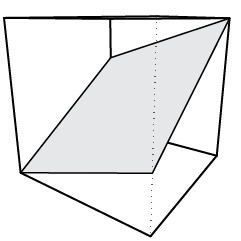
    cubesIt wasn't long ago that sensors and personal tracking seemed like pure nerdery. In the early stages of graduate school — before smartphones were popular or even widely available — I played around with sensors that had finicky battery life and Internet connectivity, the software was buggy, and the hardware looked clunky.

    New tracking devices pop up regularly these days. They're built and designed for a wider audience, and sometimes to my surprise, the devices are embraced by the target audience. It started with personal trackers that are fitness and health-related, but people are branching out now to monitoring their surroundings.

    Two showed up on my radar this past week: CubeSensors and Thermodo.
    Continue Reading

  • Feltron 2012 Annual Report

    March 14, 2013 to Self-surveillance by Nathan Yau

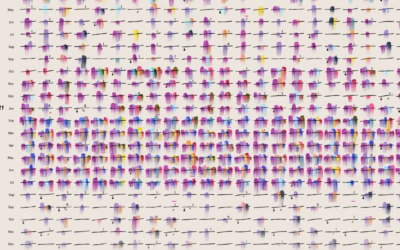
    Feltron report

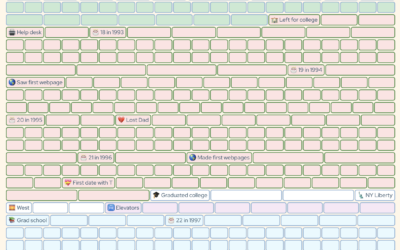
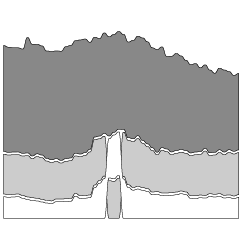
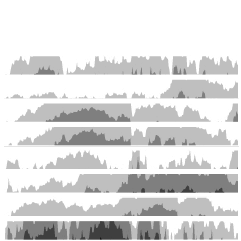
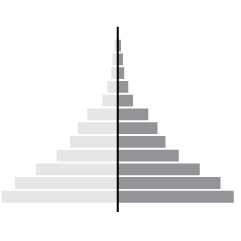
    Today might be pi day, but yesterday was Feltron Report day. The theme this year is visual density — or maybe programmatic graphics. Either way, it looks mighty fine.

  • Amiigo: The exercise tracker that identifies exercises

    March 11, 2013 to Self-surveillance by Nathan Yau

    Amiigo

    Self-tracking devices are all the rage these days. I went to the Apple store, and there was practically a whole wall of them. They were all uni-taskers though. There was one for cycling, another for running, and one for golfing. Amiigo, an Indiegogo campaign with four days left to contribute (but funded to completion five times over as of this writing), aims to track multiple exercises and figure out what you're exercise you're doing automatically.
    Continue Reading

  • Over-the-top quantified self

    February 25, 2013 to Self-surveillance by Nathan Yau

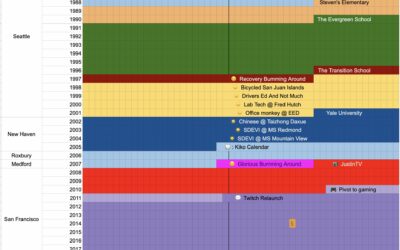
    Dancy calendar

    Chris Dancy likes to track facets of his life. A lot. Above is a bunch of automatically logged data to Google Calendar.

    At the moment, he tracks everything he can, even if he doesn't see an immediate benefit, so long as it's relatively easy to collect — and he can save the data into Evernote, Google Calendar, and Excel. You never know when something seemingly pointless will come in handy in the future.

    "If I'm on a call and my voice gets over 50 decibels, my phone notifies me," he says. "My heart rate after a conference call usually can give me better insight into the call and my feelings about the call."

    I'm all for personal data, but at some point it's just too much, and I'm pretty sure Dancy is close to that point, if he hasn't passed it already. Do you really need an alert that pops up when your voice sounds a certain way? Data can tell you a lot of things, but it doesn't have to tell you everything. [Thanks, Mat]

  • A fill-in-the-blank book to journal your life in graphs

    February 11, 2013 to Self-surveillance by Nathan Yau

    My life in graphsMy friends just got this for me, and it's pretty much the perfect gift, especially since my dissertation is about journaling and personal data collection. My Life in Graphs: A Guided Journal is a book of blank charts and graphs, and you fill in the blanks. For example, there's a map to mark your travel destinations and an x-y plot to evaluate "bucket-list viability."

    I worked on mine a couple of days ago and showed it to my wife. She said I was like a kid showing off his homework. I think that's a good thing.

  • Man takes picture of himself every day for 12 years

    September 5, 2012 to Self-surveillance by Nathan Yau

    Remember photographer Noah Kalina? He took a picture of himself every day for six years and made a time-lapse video with the photos. The Simpsons even did a spoof that showed Homer's life over a couple of minutes. Kalina's kept the picture-taking going, and it's been twelve and a half years now. He made a new video.

    Six years is a long time, but you didn't see that much change in the first video. In this one, you can start to see the age in his eyes. The forty-year update will be something to see.

    [via kottke]

  • Urban datasexual

    April 24, 2012 to Self-surveillance by Nathan Yau

    Dominic Basulto parallels the urban metrosexual to those who collect personal data.

    The same cultural zeitgeist that gave us the metrosexual - the urban male obsessive about grooming and personal appearance - is also creating its digital equivalent: the datasexual. The datasexual looks a lot like you and me, but what’s different is their preoccupation with personal data. They are relentlessly digital, they obsessively record everything about their personal lives, and they think that data is sexy. In fact, the bigger the data, the sexier it becomes. Their lives — from a data perspective, at least — are perfectly groomed.

    The difference is that metrosexuals spend their time accentuating their best features and hiding their flaws, whereas personal data collectors spend their time at Quantified Self meetups telling others the weird and interesting things they found.

  • Missing Pieces

    March 29, 2012 to Self-surveillance by Nathan Yau

    Leave it to Robert Krulwich to bring us back to life in the world of personal data. In reference to Stephen Wolfram's dive into emails, keystrokes, meetings, and phone calls:

    "It's amazing how much it's possible to figure out by analyzing the various kinds of data I've kept," Stephen Wolfram says. To which I say, "I'm looking at your data, and you know what's amazing to me? How much of you is missing."

    This is the bit I struggle with when it comes to the whole quantified self thing. There are lot of people who collect data about themselves, and it's all about optimization and trying to "fix" something. I'm more interested in how personal data collection relates to say, keeping a journal or scrapbooking. In this sense, it's not about how much of your life is missing in your personal data stream. Instead it's about how data can help you fill in the gaps.

    By the way, if you're not listening to Krulwich's show slash podcast Radiolab, who he co-hosts with Jad Abumrad, you're missing out on some fine storytelling.

  • Personal map of 2.5m GPS data points, 3.5 years in the making

    March 14, 2012 to Self-surveillance by Nathan Yau

    GPS tracking

    Aaron Parecki, co-creator of location platform Geoloqi, has collected his location every few seconds for over three years. He put his data on a map.

    Approximately one GPS point was recorded every 2-6 seconds when I was moving, and these images represent about 2.5 million total GPS points. Collectively, they represent a data portrait of my life: everywhere I’ve been and the places I’ve been most frequently. The map is colored by year, so you can see how my footprint changes over the years, depending on where I live.

    We've seen projects like this a few times before (Hey, Andy, where's your 2011 map?), but the longevity still surprises me, in a good way. (I think I've got this quantified self thing for the masses figured out. Don't even bother mentioning tracking, self-improvement, or the gadgets. Just show them stuff like this and attach some sentimental value, and there you go.)

    [via infosthetics]

  • The personal analytics of Stephen Wolfram

    March 8, 2012 to Self-surveillance by Nathan Yau

    hourly rhythms

    Stephen Wolfram examines his archive of personal data from emails to keystrokes to phone calls, going all the way back to 1990. Above shows the hourly distribution of his activities.
    Continue Reading

  • Keeping track of yourself

    March 2, 2012 to Self-surveillance by Nathan Yau

    The quantified self movement continues:

    This may sound creepy, but tens of thousands of patients around the world are already sharing information about symptoms and treatments for hundreds of conditions on websites such as PatientsLikeMe and CureTogether. This has yielded valuable results, such as the finding that patients who suffered from vertigo during migraines were four times more likely to have painful side effects when using a particular migraine drug. The growing number of self-tracking devices now reaching the market will increase the scope for large-scale data collection, enabling users to analyse their own readings and aggregate them with those of other people.

    Sure, it sounds nerdy and weird when you put it like that, but make it glow and call it fuel, and everyone goes nuts.

    [Economist]

  • Feltron Report 2010/2011 is out

    February 27, 2012 to Self-surveillance by Nathan Yau

    Feltron Report

    When Nicholas Felton headed over to Facebook last year, I thought we'd seen the last of what's become an annual tradition, but it seems to be alive and well and still looking sexy. Felton, best known for his personal annual reports, is out with a 2010/2011 report that quantifies his life for the past two years.

    The previous one was a tribute to his late father, so this year he had double the data. Most of the data is presented chronologically, but there is one panel on the next to last page that shows a comparison between the two years, which I found most interesting. More trips in 2011 to the parking garage, gas station, and the liquor store.

    [Feltron]

  • Basketball net will rate the force of dunks during Slam Dunk Contest

    February 25, 2012 to Self-surveillance by Nathan Yau

    Sometimes power dunks don't get much credit, because it's hard to see on television how hard the ball was thrown down. The MIT Media Lab created a net to fix that, and we'll get to see it in action this Saturday during the Sprite Slam Dunk Contest.

    MIT Media Lab used conductive thread to generate a reading for the force of every slam thrown down. The fabric, as flexible as the nylon in conventional basketball nets, has long been valued for its ability to transmit electrical signals in products ranging from winter gloves to high-tech carpets. By spinning the thread through a regular basketball net and connecting it to a computer chip, mounted behind the backboard, that renders the force in a graphical output, MIT and Turner have at long last found a way to instantaneously transmit the force of a dunk from the rim to your television screen.

    The past two years have been lackluster, so I wasn't planning on watching this year, but this new dimension could add some intrigue.

    [Wired via @bbhlabs]

  • Own and securely store your location with OpenPaths

    January 26, 2012 to Self-surveillance by Nathan Yau

    OpenPaths usage

    There are a lot of ways to collect your location, whether it's for journaling and personal reflection or for sharing with others, but it can be tricky making use of your data once it's stored behind company servers. OpenPaths lets you collect your data via iPhone or their just released Android app.

    We inhabit a world where data are being collected about us on a massive scale. These data are being stored, analyzed and monetized primarily by corporations; there is limited agency for the people whom the data actually represent. We believe that people who generate data through their own day-to-day activities should have a right to keep a copy of that data. When people have access to their personal data in a useful format all kinds of new things become possible. We can become better consumers: for example, we can know whether a monthly rail pass makes sense for us, or which data-plan would be most economical for our smartphone usage. More importantly, when our personal data is readily accessible and under our control we can become active collaborators in the quest for solutions to important social problems in areas such as public health, genetics or urban planning.

    You can easily view your data in the OpenPaths map interface, or download your data as CSV, JSON, or KML, and do what you want. There's also an API. Finally, if you choose to, you can contribute your data for researchers, artists, and techonlogists to create their own projects.

    I just installed the mobile app. Looking forward to what happens next.

    [OpenPaths]

  • Record your movements with AntiMap

    December 20, 2011 to Self-surveillance by Nathan Yau

    Antimap phone app

    AntiMap is an open source toolset that lets you record movements with your iPhone or Android phone. Originally developed as a way for snowboarders to record their movements and play the data back like a video game, the toolset was generalized for all outdoor activities.
    Continue Reading

  • Dynamic run paintings with Nike+

    August 8, 2011 to Self-surveillance by Nathan Yau

    Nike+ run paintings in detail

    Personal data collection can be a tough sell at times, but with the Nike+, which lets you record your runs, thousands have taken part in measuring their performance and digitally racing with others. For the most recent Nike+ campaign, interactive collective YesYesNo mapped a year's worth of runs from the Nike+ site and invited people to plug in their own runs.
    Continue Reading

  • A year of food consumption visualized

    June 29, 2011 to Self-surveillance by Nathan Yau

    Food consumption by Lauren Manning

    My pending thesis is on personal data collection (i.e. quantified self, personal informatics, self-surveillance, or whatever you wanna call it), so there's a special place in my heart for projects with data about an individual, no matter who they are. It's like taking a peek at part of someone's journal that they've decided to make public.

    Designer and architecture student Lauren Manning has documented her life for the past two years, and for her thesis project, she visualized a subset of that data — her food consumption in 2010 — with a variety of over 40 graphics. Instead of sticking with a single, optimized view of her data, she stood back and let the data fly to see what would happen.
    Continue Reading

  • One man’s travel patterns – Atlas of the Habitual

    May 9, 2011 to Mapping, Self-surveillance by Nathan Yau

    Atlas of the Habitual

    FInding himself in a new town, with a new job, Tim Clark started tracking his location on August 24, 2010, and ended 200 days later on March 13, 2011. Every time he stepped out, he turned on his GPS logger, and then would tag that trip with information about what it was for or what happened. Atlas of the Habitual is the result.
    Continue Reading

  • Life captured in data, charts, and graphs

    April 21, 2011 to Self-surveillance by Nathan Yau

    Nice piece from NYT on seeing your life in data:

    “There’s going to continue to be innovation with new, powerful data around the plumbing of the human body,” [Jason] Jacobs said. “What everyone is starting to realize is that it’s great to collect data, but somebody needs to make sense of all of this data.”

    Personal data collection is still a geek activity, but soon it won't be. Either that, or more people will become geeks. It's like, you know, so in vogue right now.

    [New York Times via @feltron]

  • Track your daily stress and health levels with Basis

    March 29, 2011 to Self-surveillance by Nathan Yau

    MyBasis

    With the success of FitBit and the current wave of self-tracking, it was only a matter of time before something like Basis came out (currently for pre-order). It's the same idea as FitBit, which is a clip that tracks your movement so you can see how much you move and monitor your sleep patterns. However, instead of a clip, Basis is a watch and comes with additional sensors for heart rate, temperature, and galvanic skin response (sweat). Come near your computer and data uploads automatically via bluetooth.
    Continue Reading

Unless otherwise noted, graphics and words by me are licensed under Creative Commons BY-NC. Contact original authors for everything else.