Category: Data Design Tips

  • Think like a statistician – without the math

    Posted Mar 4, 2010 to Data Design Tips, Statistics / 51 comments

    Think like a statistician – without the math

    I call myself a statistician, because, well, I'm a statistics graduate student. However, ask me specific questions about hypothesis tests or required sampling size, and my answer probably won't be very good.

    The other day I was trying to think of the last time I did an actual hypothesis test or formal analysis. I couldn't remember. I actually had to dig up old course listings to figure out when it was. It was four years ago during my first year of graduate school. I did well in those courses, and I'm confident I could do that stuff with a quick refresher, but it's a no go off the cuff. It's just not something I do regularly.

    Instead, the most important things I've learned are less formal, but have proven extremely useful when working/playing with data. Here they are in no particular order.
    Continue Reading

  • 11 Ways to Visualize Changes Over Time – A Guide

    Posted Jan 7, 2010 to Data Design Tips, Featured / 32 comments

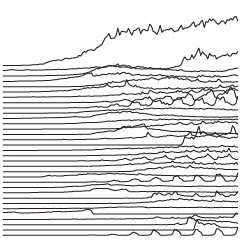
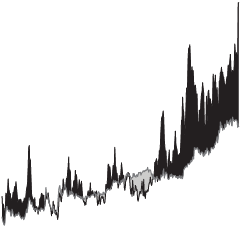
    Deal with data? No doubt you've come across the time-based variety. The visualization you use to explore and display that data changes depending on what you're after and data types. Maybe you're looking for increases and decreases, or maybe seasonal patterns.

    This is a guide to help you figure out what type of visualization to use to see that stuff.
    Continue Reading

  • 9 Ways to Visualize Proportions – A Guide

    Posted Nov 25, 2009 to Data Design Tips, Featured / 35 comments

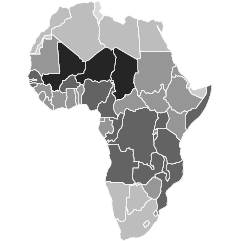
    With all the visualization options out there, it can be hard to figure out what graph or chart suits your data best. This is a guide to make your decision easier for one particular type of data: proportions.

    Maybe you want to show poll results or the types of crime over time, or maybe you're interested in a single percentage. Here's how you can show it.

    pie

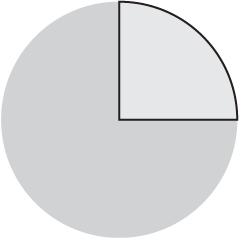
    We all know about the pie chart. The circle represents the whole, and the size of wedge represents a percentage of that whole. Together, those represented values, add up to 100 percent. Use this only if you're comparing a few values (like three or less) or if you're like me, use it for a ton of categories to annoy the BI people every now and then. Continue Reading

  • Chart Junk vs. Eye Candy: What’s the Difference?

    Posted Sep 25, 2009 to Data Design Tips, Featured / 20 comments

    There's this one phrase that really bothers me when it comes to data graphics. No doubt you've heard it or read it, and maybe it even popped into your head once or twice.

    The phrase I'm talking about is: "Edward Tufte is crying."

    People like to say this when they see a graphic that doesn't fit the ET law of high data/ink ratio. Then after the commenter has declared that ET is in fact a very emotional man, the graphic is classified "chart junk."

    First off, I'm pretty sure ET isn't that melodramatic. He doesn't cry over a bad graph nor does he die a little inside or roll over in his grave if he were dead. I don't think an angel get its wings every time he rings a bell either. Although I could be wrong about the latter.

    Second, not everything that fails to fit the mold of a traditional graph, visualization, or whatever you want to call it, is chart junk. One person's chart junk is another person's eye candy. What you see just depends on what angle you're looking at it from.
    Continue Reading

  • What Visualization Tool/Software Should You Use? – Getting Started

    Posted Sep 3, 2009 to Data Design Tips, Featured / 55 comments

    toolAre you looking to get into data visualization, but don't quite know where to begin?

    With all of the available tools to help you visualize data, it can be confusing where to start. The good news is, well, that there are a lot of (free) available tools out there to help you get started. It's just a matter of deciding which one suits you best. This is a guide to help you figure that out.
    Continue Reading

  • Important Data – Please Act Responsibily

    Posted Jul 20, 2009 to Data Design Tips / 11 comments
    drunk
    Photo by nyki_m

    Data visualization and infographics come in many forms. Some are comical and purely made for entertainment. Others are made for decisions, and important decisions at that. Let's focus on the latter right now.

    To make educated decisions based on graphics, you need accurate ones, and to make accurate graphics, you need a full understanding of the data.

    If you don't know about the data - the context of where it came from or how it was collected - your visualization or infographic is simply a data comic that could potentially misinform its readers.
    Continue Reading

  • 6 Easy Steps to Make Your Graph (Really) Ugly

    Posted Jun 15, 2009 to Data Design Tips / 49 comments

    We spend so much time trying to make our graphs accurate, simple, understandable, etc that we forget the lost art of making graphs that are inaccurate, unreadable, make absolutely no sense, and make your eyes want to vomit. I'm so tired of understanding data. I want to experience it, and I know you want to also.

    So this one's for you, crappy graph.

    We'll start with the graph below from a poll a few weeks ago:

    What Data-related Area Are You Most Interested In?

    It's perfectly fine, but there's just one problem: you can read it, and when you're trying to do ugly, readability is a no-no. With ultimate confusion in mind, let's move on to our six easy steps to ultimate ugly. Continue Reading

  • Rise of the Data Scientist

    Posted Jun 4, 2009 to Data Design Tips, Featured, Statistics / 44 comments

    Photo by majamarko

    As we've all read by now, Google's chief economist Hal Varian commented in January that the next sexy job in the next 10 years would be statisticians. Obviously, I whole-heartedly agree. Heck, I'd go a step further and say they're sexy now - mentally and physically.

    However, if you went on to read the rest of Varian's interview, you'd know that by statisticians, he actually meant it as a general title for someone who is able to extract information from large datasets and then present something of use to non-data experts.
    Continue Reading

  • Visual Representation of Tabular Information – How to Fix the Uncommunicative Table

    Visual Representation of Tabular Information – How to Fix the Uncommunicative Table

    This is a guest post by Martin Krzywinski who develops Circos, a GPL-licensed (free) visualization tool that can help you show relationships in data. This article is based on a longer writeup which you can find here.

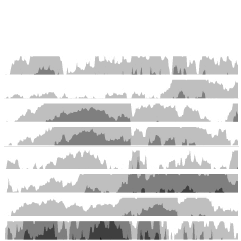
    Suppose that you are reading an article and the text refers you to a table on the next page. Before you turn the page, what are your expectations of the table? Chances are, you would like it to communicate trends and patterns. Chances are, too, that it will fail and simply deliver numerical minutiae. You are left hunting around the numbers for a while, only to return to the text in hopes that the table's data trends will be communicated elsewhere.
    Continue Reading

  • Data Visualization is Only Part of the Answer to Big Data

    How can we now cope with a large amount of data and still do a thorough job of analysis so that we don't miss the Nobel Prize?
    Bill Cleveland, Getting Past the Pie Chart, SEED Magazine, 2.18.2009

    For the past year, I've been slowly drifting off my statistical roots - more interested in design and aesthetics than in whether or not a particular graphic works or the more numeric tools at my disposal. I've always had more fun experimenting on a bunch different things rather than really knuckling down on a particular problem. This works for a lot of things - like online musings - but you miss a lot of the important technical points in the process, so I've been (slowly) working my way back to the analytical side of the river.

    If you really want to learn about a large dataset, visualization is only part of the answer. It's an exploratory process. You create a graph. You create a whole bunch of graphs. Notice anything interesting? Okay, let's look over there. This process is called exploratory data analysis, coined by famed statistician John Tukey back in the 1970s. Too often we settle on a particular graphic because it looks pretty, or worse, it helps prove our point. We get blinded by outside motivations, that we forget to listen and look at what else the data have to say. On the flip side, we often like to visualize everything at once and leave it at that. This works to an extent, but we miss out on a lot of details.

    Basically, what I'm trying to say is that design can do wonders for visualization, yes, but so can analysis. Put the two together, and you're going to gain a much better understanding of a dataset than if you were to have just one or the other. In my experience, designers are afraid of statistical methods and statisticians are oblivious to design. I say - put the two together. Learn both, and we'll all be that much better at understanding the even bigger data to come.

  • Flow Chart Shows You What Chart to Use

    Posted Jan 15, 2009 to Data Design Tips / 17 comments

    Flow Chart Shows You What Chart to Use

    Amit Agarwal, of Digital Inspiration, posts this Andrew Abela creates this flow chart that helps you decide, well, what type of chart to use. Start in the middle with what you want to show - comparison, relationship, distribution, or composition - and then work your way out to the number of variables. Pretty timely for our brand new Visualize This project.

    [via Digital Inspiration]

  • One Death is a Tragedy; a Million is a Statistic

    Posted Jan 9, 2009 to Data Design Tips / 21 comments

    Photograph by *Your Guide

    I posted a comic from xkcd last week that implied graphs and data lead to a decline in love. I didn't really think much of it, but Jim commented that an episode from This American Life (episode 88: Numbers), was very much related to the topic of personal data and what we often miss out on as a result. The lead-in to the show reads:

    Numbers lie. Numbers cover over complicated feelings and ambiguous situations. In this week's show, stories of people trying to use numbers to describe things that should not be quantified.

    This reminded me of Joseph Stalin's well known quote, "One death is a tragedy; a million is a statistic." It's a horrible thing to say, but when it comes to data visualization and analysis, it's true a lot of the time. We have a huge dataset and we have to extract information from it. In the process though, we forget that every one of those numbers has real non-numeric value to it. There are emotions and feelings. Life is complex. Data represents life, and therein lies the purpose and meaning of FlowingData.
    Continue Reading

  • Steve Jobs on Design

    Posted Oct 31, 2008 to Data Design Tips, Quotes / 2 comments

    Most people make the mistake of thinking design is what it looks like… People think it's this veneer -- that the designers are handed this box and told, 'Make it look good!' That's not what we think design is. It's not just what it looks like and feels like. Design is how it works.
    — Steve Jobs, The New York Times, 2003

    I post this not because I like Apple products, but because it's true (and because I like Apple products). I'm no designer, but as a statistician, I have tremendous respect for those who are. Have a nice weekend all.

    [via swissmiss]

  • Great Data Visualization Tells a Great Story

    Posted Oct 10, 2008 to Data Design Tips, Featured / 17 comments

    StorytellerThink of all the popular data visualization pieces out there - the ones that you always hear in lectures, read about in blogs, and the ones that popped into your head as you were reading this sentence. What do they all have in common? They probably all told a great story. Maybe the story was to convince us of something, compel us to action, enlighten us with new information, or force us to question our own preconceptions. Whatever it is, truly great data visualization reaches us at a very human level and that is why we remember them.

    Let's face it. Data can be boring if you don't know what you're looking for or don't know that there's something to look for in the first place. It's just a mix of numbers and words that mean nothing other than their raw value. The great thing about statistics and data visualization though is that they provide us with the tools to learn that the data are much more than a bucket of numbers. There are stories in that bucket. There's meaning, truth, and beauty. Sometimes the stories will be simple and other times complex. Some will belong in a textbook; others will come in novel form. It's up to the statistician, computer scientist, designer, or analyst to make that decision.
    Continue Reading

  • Sketching Around Personal Brand Tracking

    Posted Oct 3, 2008 to Data Design Tips / 8 comments

    Sketching Around Personal Brand Tracking

    This is a guest post by Miguel Jiménez, a user experience and interaction designer based in Madrid.

    There's a lot of noise today around Personal Branding and constructing your own self as a global brand on a certain topic. It makes complete sense to increase your professional value reflecting on others and using the Internet to build up this reputation. It's said that you should start by creating an online identity, supposedly to reflect your Real World™ one, with an entry point in the form of a blog or similar. That's a nice introduction and it’s quite easy to implement, but the main problem to the process of constructing a self-brand is monitoring and tracking how your efforts perform and the next steps you should take. So let's have a conceptual look and sketch around the statistical data found nowadays in the Internet.
    Continue Reading