
Anatoly Zenkov provides this nifty tool (Mac and PC) to track your mouse pointer. Really simple. Just start it, let it run, minimize the window, and carry on as usual. In the end, you get this image that looks something like a Pollock. Circles show areas where the pointer didn’t move while the tracks show movement.
The above is my own activity during the past couple of hours. I was just randomly browsing while watching the Laker game, so it’s kind of all over the place. Run while using a single application for a while, and you might see something like Zenkov’s tracks on Photoshop.
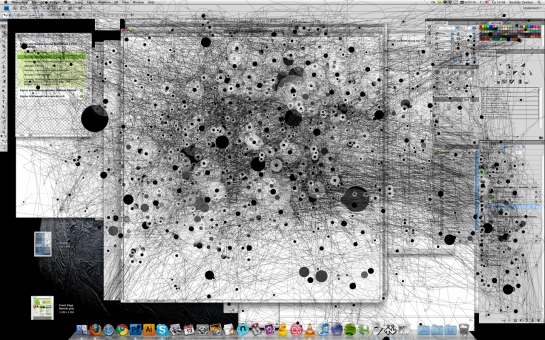
What do your tracks look like?
[via feltron]
Update: Anatoly has setup an actual site for the app instead of it sitting in the dropbox boonies of boontown. Go there for the most up-to-date info.
 Visualize This: The FlowingData Guide to Design, Visualization, and Statistics (2nd Edition)

Pingback: Track Mouse Activity Visualization « Visual Security
Mouse tracking seems a little random, though it would be interesting to compare with eye tracking data. I guess there are two groups of people, one of which has matching eyetracking & mouse-heatmaps, the other uses keyboard more often.
What I’d really like to see is keylogging data: QWERTY, DVORAK were designed by “average usage”, but we could design individual keyboards by running a keylogger for a month on the subject’s computer and reorder keys to fit their profile. (If somebody builds a cheap Optimus Keyboard-clone that is). When switching only 2 keys a day it should be easy to adapt…
I really don’t think we need to re-invent the keyboard, we have got quite good at using them as they are.
Actually, reinventing it could help improve all keyboards and also diminish carpal tunnel, etc. That’s besides making them easier to use. I’d hate to have that mentality whenever there’s a leap in technology..
DVORAK is not a reinvention of the keyboard, It has been around since 1930s. And the people that use it claim it alot easier to use. Personally i have not taken the time to learn it but i have a buddy who switches seamlessly between the two layouts and if he has a choice he will use dvorak
Yes – love the idea of using a keylogger – I might give that a try.
QWERTY was actually designed to slow down typists using the early mechanical typewritters, which were prone to jamming.
These days when a lot of typing is down by thumbs on handhelds seems like a great time to rethink that input paradigm.
While it’s true that the early typewriters were prone to jamming, and that the QWERTY layout was meant to reduce jamming, it did NOT work by slowing down typists.
The layout put letters that are often next to each other in words further apart, since it was the simultaneous pressing of adjacent keys that caused jamming.
The many myths of Dvorak superiority were thoroughly debunked twenty years ago:
http://www.utdallas.edu/~liebowit/keys1.html
The only thing remarkable about Dvorak is the staying power of the romantic B.S. about the little format that almost made it.
Like Betamax aficionados, Dvorak’s lonely fans pine for what they imagine could have been…
I would have to agree. At the begining of this year I changed my keyboard to Dvorák I after wanting to switch for a long time. I look at the keyboard, and it just made for a better keyboard I thought. with the vowels on the primary keys. After using for just a little while I was able to switch back and forth. I was just a matter of knowing were the keys were on both formats(keep in mind I do look at my keyboard while typing for the most part)
To keep it short I found the keys are not spread apart enough for any real difference. Having the common key spread out I find actually easier to type.
I going to work with the dvorak for a little longer, but I think it is best to stick with the style popular and perfect it.
Want to fix keyboard issues… perfect dictation software.
“Mac” version runs fine under Linux. It seems to only cover one monitor, though?
Pingback: Infographic of the Day: Your Computer Use, Visualized Like a Jackson Pollock | Web Design Cool
@nathan – I’m running the PC version and it only covers one monitor as well. Still kind of cool though.
I have a feeling mine will look like my normal monitor but but with a big, solid black ball over my Stumble button.
true that.
Second that :)
I used this a while ago and yeah, it had a black button over stumble and slightly under that there were a lot of lines since I move down slightly to use the mouse wheel.
Mac version runs well under Linux, but Java is putting too much load for such a small application.
Did someone have to use gimp/ps to overlay the tracking with the screenshot? Should have that built in!
I second Michael, mine is just gonna have a huge solid black circle around my stumble button.
Agreed
Pingback: Personal information tracking websites « Earththing
Where is the full screen mode? it covers just a part of my monitor… 1920×1080
it only covers part of the monitor, but i think it’s scaled so that it’s actually the whole thing. i think.
Because it is scaled
Pingback: Ambient Mouse Art App (not the rodent) « Absurd Delight
Looks like a fun program! Too bad I’m running 64-bit Windows. -_-
works fine on 64-bit windows.
Can you not run in compatbility mode? (Right click on .exe, compatbility mode tab, try Win XP)
so sick
Nice app ! So shame, we can not change the parameters of the screen’s resolution…
Pingback: Wait till I come! » TTMMHTM: Scuba attacks in Norway,safer internet, mouse tracking and SMS API
Pingback: How much do you really need your screen - TeakDoor.com - The Thailand Forum
Pingback: Tracking Mouse Activity | VizWorld.com
Pingback: Mouse Map for 10th Feb
I was trying to commit on your other post, but I guess it is full. I wanted to share about what you stated,”tracking everything in our lives” Moses prayed a prayer saying,”Teach us to number our days.”(Ps.90:12) This is a AMAZING REVELATION! If we figure we are to live 80 years at best, then count from our present age till then the number of days till 80 will astound you. If we to log all that we do, what we spend the majority of our time on this will astound also. If you have stumbled upon this page, this response, and are interested in this topic..Then I want to encourage you to listen to Mike Bickle’s 3 part serious on “The Power of a Focused Life,” The link is posted as my web site. Also check out MikeBickle.org
Religious spam, god is ashamed
I cant figure out where it saves the track to. i cant find it under any of my documents. any help?
Check the folder where the mousepath.exe file is; this is where it’s saving mine!
Pingback: Not Writerly « The Empty Pen
Pingback: Mousepath – Visualisierungen der eigenen Aktivität
Pingback: Mausverfolgung – Openmedi
Pingback: Lord Gonchar - Mouse Path
So any word on dual monitor support? That would be pertty cool…
I’m using a laptop with a touch pad, not a mouse.
And I cannot make it work… is my lack of mouse why?
I look forward to being able to use this…
thanks, John
Doesn’t really work right with my two monitors.
I got rid of this when it didn’t work, but as I got a follow-up comment in my inbox I thought I’d try it again. I still cannot make it work, and it’s obvious that most of you do make it work!
How do you do it? I’ve got the box coming up saying ‘run’ and ‘save’ and I’ve played quite a bit with the two boxes which come up. But no saved files with blobby pictures. Can someone explain in easy to understand terms what I might be doing wrong?
Many thanks! I’m using Windows not a Mac, although the thing I downloaded is called MACOSX zipped file, and there’s another thing called mousepath.exe. HELP!!!
Awesome application…
Its crazy …..
Does this not really track where web designers put things more that were we look for things? Interesting that we don’t see many clicks around the start button in the diagram above.
That is because the dots apparently represent pauses in mouse movement, not clicks.
Pingback: Things I learned this week – #7 | dougbelshaw.com/blog
Pingback: Links do dia « Designlab
Pingback: links for 2010-02-14 | Glorified Monkey
Pingback: Track Mouse Activity On Your Computer | nothing to see here
Pingback: Ukens anbefalte – 15 February 2010 | Raymond Karlsen
Love It ~ used it for some arts
http://operon-pathos.deviantart.com/art/Track-154192240
I wish it recorded mouse clicks in some form as well.
Pingback: Art 357 – Spring 10 » Blog Archive » A very local “mapper” to complement your GPSing
Pingback: Mouse tracker «
Could also combine it with Microsoft’s free MultiPoint SDK and use different color for the tracks generated by each user’s mouse pointer
Pingback: Mouse Paths « The Collected Mike
Pingback: Ooooooooooooh! « Media Project
Did one of these a bit ago
http://www.flickr.com/photos/duzo/4297503559/
Pingback: Ierakstīt peles darbību | radikaalz blogs
Pingback: philxthomas.com – fixed gear, photography, stuff » 2010 » February » 19
Pingback: Sigue el rastro de tu mouse « noquedanblogs.com
Pingback: Mousepath – schöne Auswertung und Optimierung von Nutzeraktivitäten | Dackworld
Pingback: Advurt » Mouse Tracks
Pingback: Mousepath – åœ¨è®¡ç®—æœºä¸Šè·Ÿè¸ªé¼ æ ‡æ´»åŠ¨ - å°ä¼—软件
Pingback: Human Ink. » Blog Archive » EL CAMINO DEL RATÓN!
Pingback: Mighty mouse « my heart behaves
Pingback: Track Mouse Activity On Your Computer FlowingData | Perculaclowns Blog
Pingback: The Origins Of Spyware And How To Protect Against It
Pingback: Daily Distraction – Double Feature Friday
Pingback: links for 2010-03-11 « sySolution
Pingback: Track your mouse « Art is just frozen music
Pingback: Track Mouse Activity « アルスロンガ、ウィータブレウィス
Do some research into DVORAK, it’s not easier, in studies the basic QWERTY layout had higher WPM rates and caused less stress in the carpels and meta-carpels over time. Just saying, just because it’s different doesn’t mean it’s better.